Translation app
Fast, clear, natural translation
Translate text, voice, photos, and live conversations in one beautifully simple app. Built for travel, study, work, and everyday communication.
iOS only · on the App Store
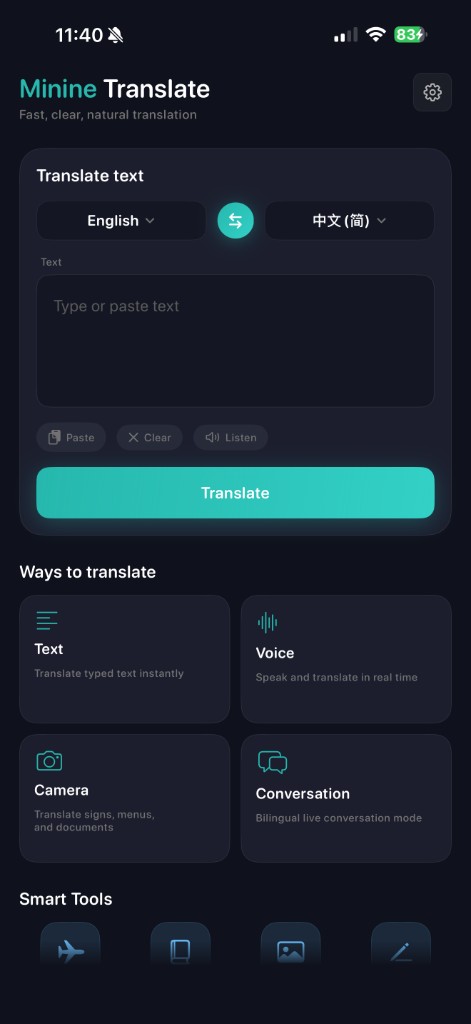
Main menu
Home screen, one tap away from every mode
The main screen centers on a large Text area with language pickers, then highlights four ways to translate—Text, Voice, Camera, and Conversation—plus a row of Smart tools for travel, phrases, images, and writing. Settings are one tap in the header.
- Ways to translate — your entry points from the home hub
- Text for typed or pasted input
- Voice & conversation for speaking and turn-by-turn chat
- Focus flow — dark UI, teal accents, minimal clutter
Everything you need to translate with ease
From quick text to real-time bilingual conversations, Minine Translate is made for the way you actually communicate.
Text translation
Type or paste text and get clear, natural translations in moments.
Camera translation
Point at menus, signs, documents, and labels — see translations on the spot.
Voice translation
Speak naturally. Hear and read translated results in seconds.
Conversation mode
Bilingual live conversation for face-to-face situations — travel, work, and daily life.
Made for multilingual life
Translate across the languages you use most. Communicate with confidence, wherever the day takes you.
Designed for real-world, multilingual use.
Built for real-world communication
Travel
Read menus, signs, and get through local conversations with less stress.
Study
Look up words and phrases quickly so you stay in flow.
Work
Share ideas across languages with clarity in meetings and messages.
Daily life
Handle everyday text and short chats in another language, easily.
More helpful tools
A flexible set of utilities around translation — content may vary by app version.
Travel helper
Phrases and scenarios tailored to trips and on-the-go situations.
Phrase book
Save and review expressions you use often.
Image utility
Work with text from your photos in a few taps.
Writing assist
Refine tone and clarity when you need a hand with wording.
See it in the app
A focused, dark interface with teal highlights — built for quick translation, anywhere.
Use the tabs to switch — one iPhone screen at a time. Only the raw screenshot is shown below (no card or frame around the image).

Launch
Why Minine Translate
Fast and intuitive
Get translations without wading through clutter.
Calm, focused design
A distraction-free place to work with language.
Multiple ways to translate
Text, camera, voice, and conversation in one app.
Built for every day
From quick looks to longer chats, it fits your routine.
Questions
What can I translate with Minine Translate? ▼
You can translate text you type or paste, text from the camera, spoken phrases, and live bilingual conversations. Specific languages and options depend on the app version and your device.
Does the app support voice and camera translation? ▼
Yes. Voice input and camera-based translation are part of the core experience. Capabilities are refined over time in updates.
Can I use it for travel and daily communication? ▼
Yes. It is designed for travel, work, study, and everyday use — from signs and menus to short conversations.
Does the website support multiple languages? ▼
This site is available in several languages. You can change the site language in the header. The in-app language list may differ from the site.
How do I download the app? ▼
Use the App Store link on this page — the buttons open the Minine Translate listing on the App Store. Minine Translate is for iOS only.
Ready to translate with confidence?
Use Minine Translate for text, voice, photos, and live conversation — in one simple experience.